;%20}%20.cls-2%20{%20fill:%20url(%23_未命名的渐变_6);%20}%20.cls-3%20{%20fill:%20url(%23_未命名的渐变_7);%20}%20.cls-4%20{%20fill:%20url(%23_未命名的渐变_6-3);%20}%20.cls-5%20{%20fill:%20url(%23_未命名的渐变_6-2);%20}%20.cls-6%20{%20fill:%20url(%23_未命名的渐变_6-4);%20}%20.cls-7%20{%20fill:%20url(%23_未命名的渐变_7-2);%20}%20.cls-8%20{%20isolation:%20isolate;%20}%20%3c/style%3e%3clinearGradient%20id='_未命名的渐变_2'%20data-name='未命名的渐变%202'%20x1='20.6'%20y1='43.1'%20x2='20.6'%20y2='3.1'%20gradientTransform='translate(0%2044)%20scale(1%20-1)'%20gradientUnits='userSpaceOnUse'%3e%3cstop%20offset='0'%20stop-color='%2339affe'/%3e%3cstop%20offset='.8'%20stop-color='%23084aff'/%3e%3c/linearGradient%3e%3clinearGradient%20id='_未命名的渐变_6'%20data-name='未命名的渐变%206'%20x1='14.7'%20y1='18.3'%20x2='14.7'%20y2='33.5'%20gradientTransform='translate(0%2044)%20scale(1%20-1)'%20gradientUnits='userSpaceOnUse'%3e%3cstop%20offset='0'%20stop-color='%23f0f9ff'/%3e%3cstop%20offset='.8'%20stop-color='%23b2d9ff'/%3e%3c/linearGradient%3e%3clinearGradient%20id='_未命名的渐变_6-2'%20data-name='未命名的渐变%206'%20x1='14.7'%20y1='33.5'%20x2='14.7'%20y2='18.3'%20xlink:href='%23_未命名的渐变_6'/%3e%3clinearGradient%20id='_未命名的渐变_6-3'%20data-name='未命名的渐变%206'%20x1='16.1'%20y1='18.5'%20x2='16.1'%20y2='33'%20xlink:href='%23_未命名的渐变_6'/%3e%3clinearGradient%20id='_未命名的渐变_7'%20data-name='未命名的渐变%207'%20x1='14.5'%20y1='23.4'%20x2='29.1'%20y2='23.4'%20gradientTransform='translate(0%2044)%20scale(1%20-1)'%20gradientUnits='userSpaceOnUse'%3e%3cstop%20offset='.2'%20stop-color='%23f0f9ff'/%3e%3cstop%20offset='1'%20stop-color='%23b2d9ff'/%3e%3c/linearGradient%3e%3clinearGradient%20id='_未命名的渐变_6-4'%20data-name='未命名的渐变%206'%20x1='20'%20y1='32.4'%20x2='20'%20y2='15.5'%20xlink:href='%23_未命名的渐变_6'/%3e%3clinearGradient%20id='_未命名的渐变_7-2'%20data-name='未命名的渐变%207'%20x1='14.5'%20y1='23.4'%20x2='29.1'%20y2='23.4'%20xlink:href='%23_未命名的渐变_7'/%3e%3c/defs%3e%3c!--%20Generator:%20Adobe%20Illustrator%2028.6.0,%20SVG%20Export%20Plug-In%20.%20SVG%20Version:%201.2.0%20Build%20709)%20--%3e%3cg%3e%3cg%20id='_图层_1'%20data-name='图层_1'%3e%3cpath%20class='cls-1'%20d='M38.7,19.1C38.7,9,30.6.9,20.6.9S2.5,9,2.5,19.1s4.7,14.1,11.3,16.8h0c.8.4,1.3.6,1.3,1.3,0,.7-1,2.3-.1,3.2.8.9,5.6.8,10.8-1.7,5-2.4,9.4-6.8,11.5-12.6.9-2.1,1.3-4.4,1.3-6.9Z'/%3e%3cimage%20class='cls-8'%20width='338'%20height='371'%20transform='translate(-23.5%20-23.7)%20scale(.2)'%20xlink:href='未标题-1-1.png'/%3e%3cimage%20class='cls-8'%20width='367'%20height='392'%20transform='translate(-19.9%20-24)%20scale(.2)'%20xlink:href='未标题-1-2.png'/%3e%3cpath%20class='cls-2'%20d='M13.8,11c-.7-.3-1.3-.5-1.6-.5-1.4-.2-1.2,0-1.2.9,0,0,0,2.2,0,6.8s3.9,6.9,5.5,7.2c1.4.3,1.8.2,1.9,0,0,0,0-.1,0-.2v-7.7c0-3.7-2.6-5.7-4.6-6.5Z'/%3e%3cpath%20class='cls-5'%20d='M16.5,25.5c1.4.3,1.8.2,1.9,0-5.1-1.8-4.5-7.3-4.5-9.4v-5.1c-.7-.3-1.3-.5-1.6-.5-1.4-.2-1.2,0-1.2.9,0,0,0,2.2,0,6.8s3.9,6.9,5.5,7.2Z'/%3e%3cpath%20class='cls-4'%20d='M18.4,25.5c0,0,0-.1,0-.2v-7.7c0-3.7-2.6-5.7-4.6-6.5v5.1c0,2.1-.6,7.6,4.5,9.4Z'/%3e%3cpath%20class='cls-3'%20d='M28.6,10.5c-1.4.2-2.5.6-3.4,1.1-3.2,1.8-3.6,4.9-3.6,6.8,0,0,0,.2,0,4.7s-1.2,3.4-2.2,4.2c-1.7,1.3-3.6,1.1-4.1,1-.2,0-.4,0-.6,0-.3,0-.4.2,0,.7,1.3,1.2,4.3,2.3,7.4,1.7,5.3-1.3,6.9-5.9,6.9-8.6v-10.6c0-.7,0-1-.5-.9Z'/%3e%3cpath%20class='cls-6'%20d='M23.4,26c.8-.9,1.8-2.6,1.8-5.3v-9.1c-3.2,1.8-3.6,4.9-3.6,6.8,0,0,0,.2,0,4.7s-1.2,3.4-2.2,4.2c-1.7,1.3-3.6,1.1-4.1,1-.2,0-.4,0-.6,0,2,.4,5.5,1.2,8.6-2.2Z'/%3e%3cpath%20class='cls-7'%20d='M14.8,28.8c1.3,1.2,4.3,2.3,7.4,1.7,5.3-1.3,6.9-5.9,6.9-8.6v-10.6c0-.7,0-1-.5-.9-1.4.2-2.5.6-3.4,1.1v9.1c0,2.7-1,4.4-1.8,5.3-3.1,3.4-6.6,2.6-8.6,2.2-.3,0-.4.2,0,.7Z'/%3e%3c/g%3e%3c/g%3e%3c/svg%3e)


Instagram DMs and Comment Engagement, Across Any Language Barrier
A DM translation tool purpose-built for Instagram. Pair every beautiful image with the most authentic copy.
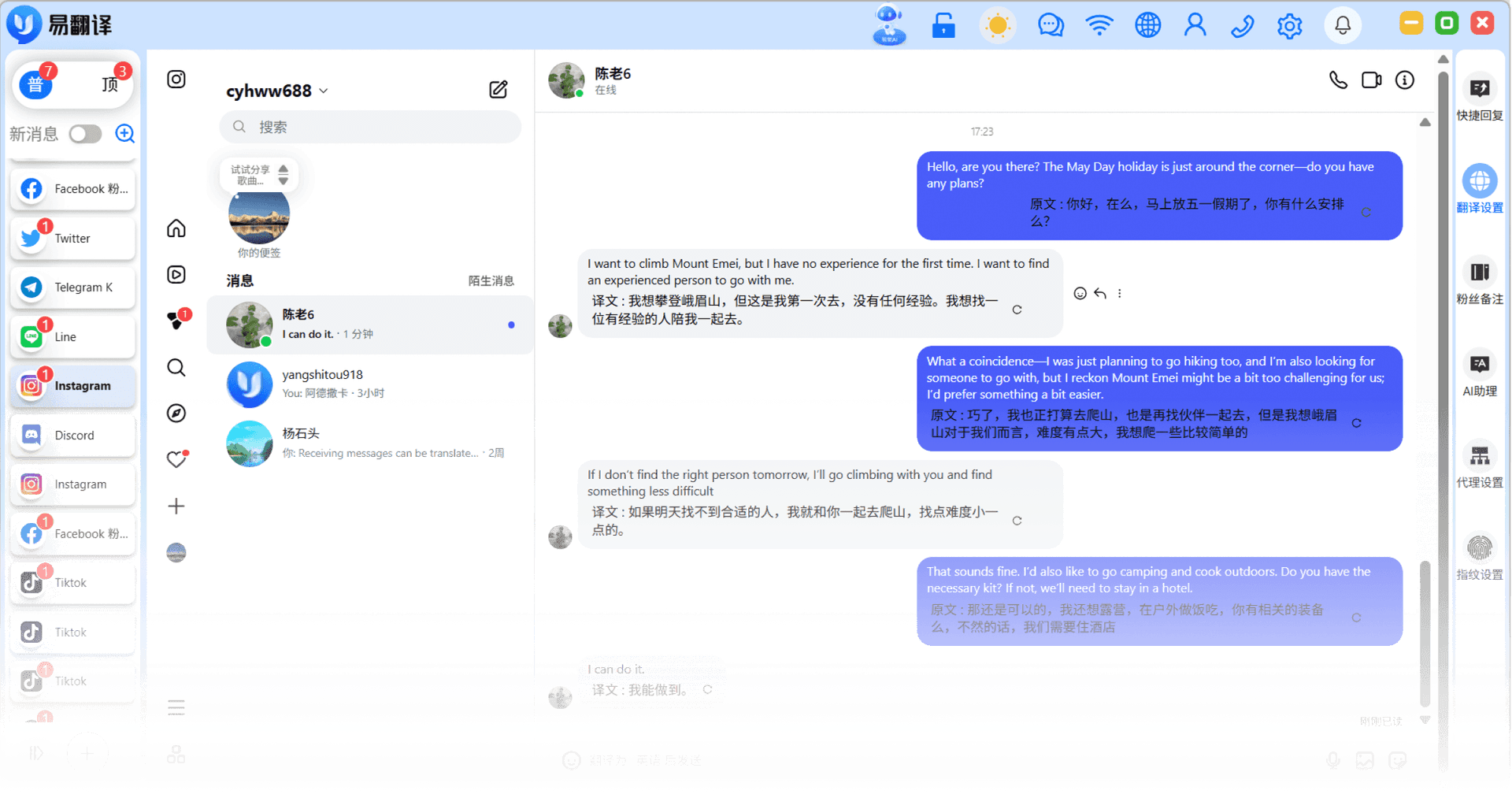

DM Translation
Chat with overseas influencers/customers with zero language barriers

Comment Translation
Quickly reply to follower comments and boost account weight

Story/Post Translation
Translate updates from creators you follow with one click and catch emerging trends

Influencer Resource Management
Tag partnership intent and build an influencer resource database
DM and Comment Translation
Common Issue
You want to reach out to an overseas influencer for a partnership, but your DM comes out awkward and unconvincing.
Solution
Traneasy provides AI-polished translation, making your outreach more natural and courteous. It automatically translates influencer replies so you can follow up on partnerships in real time.


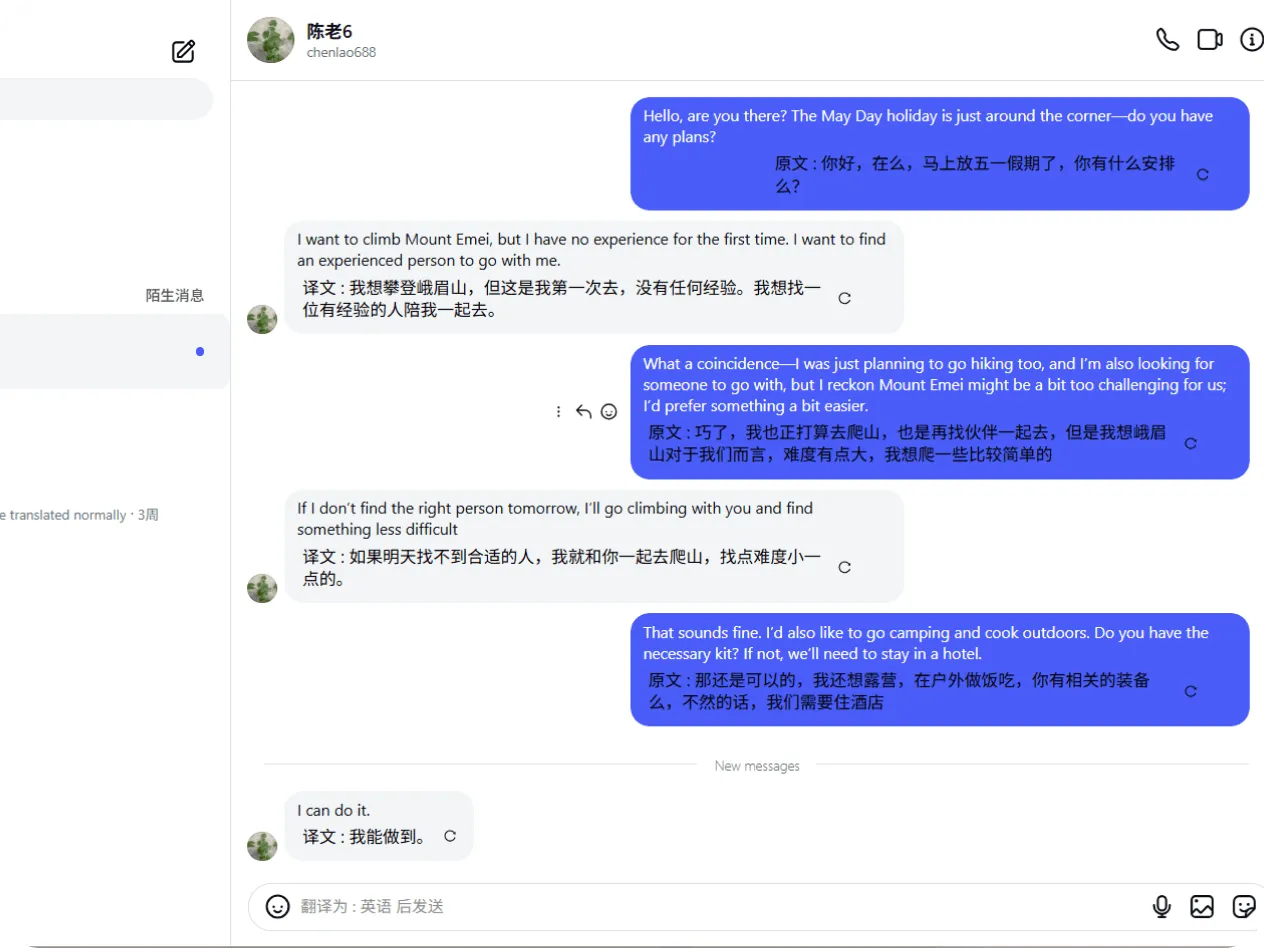
Cluster Messaging
Common Issue
Sending the same message means copying and pasting endlessly — once your contact and group count grows past a certain point, efficiency plummets.
Solution
Supports bulk message sending — just select your recipients, set a sending interval, write your message, and click confirm to send to everyone at once.
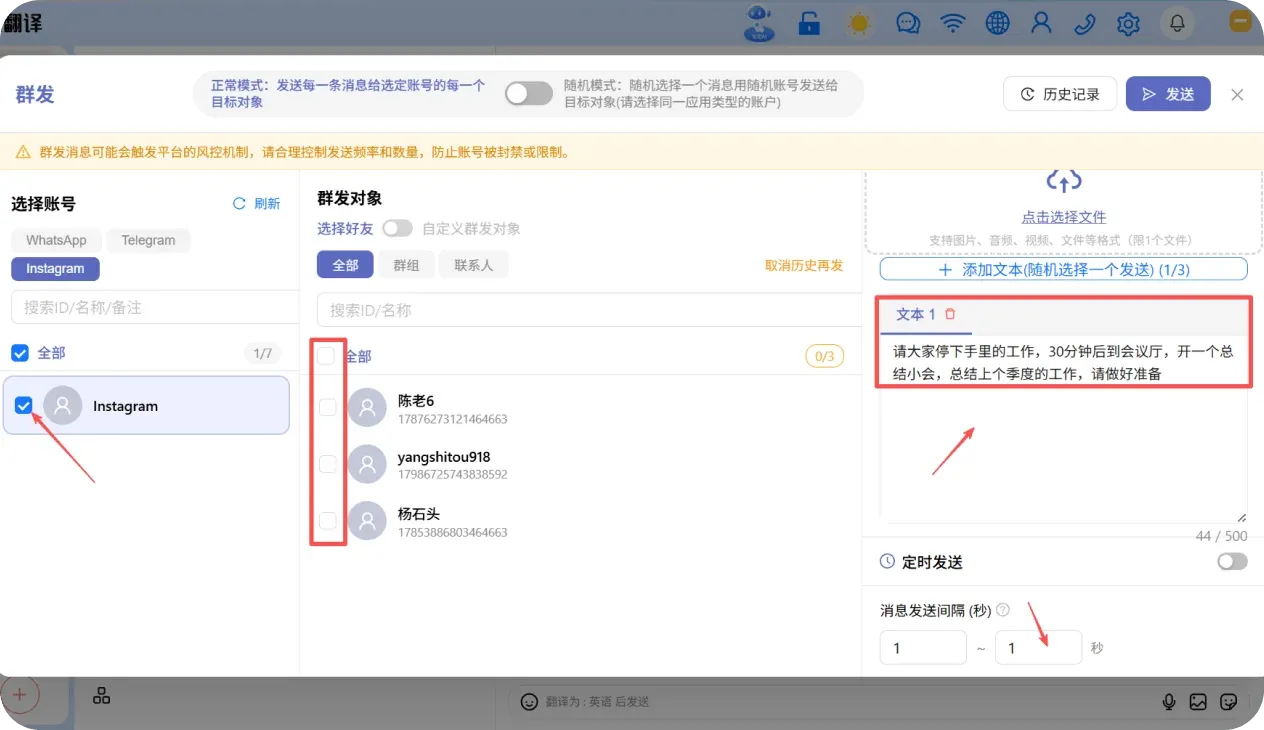
Independent Language Personalization
Common Issue
You follow major overseas brands or creators but can't understand their captions and stories.
Solution
Set an independent translation language based on each creator's home country — no more switching back and forth between languages, quick and convenient.
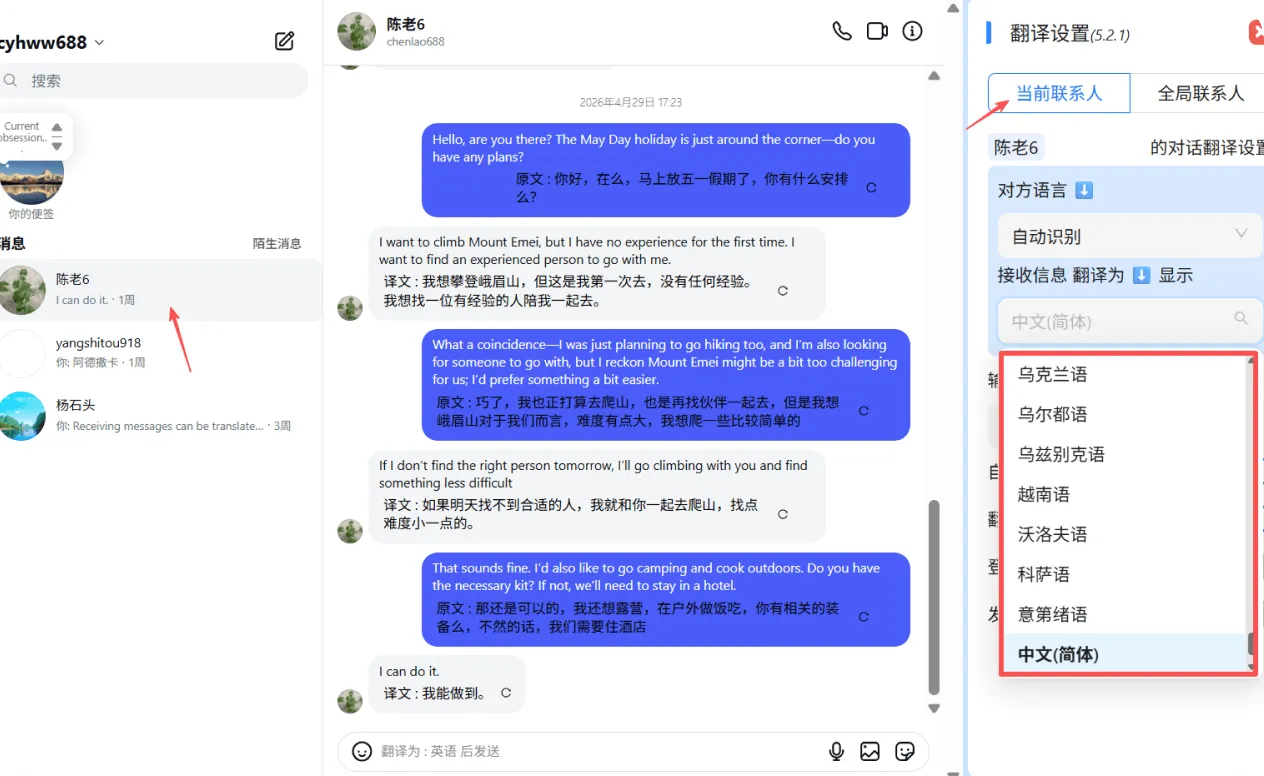
Traditional Approach vs. Traneasy Integration
Break through influencer communication bottlenecks and build a refined operations loop

Who it's for
Who Is It Best For?
Covers influencer marketing and brand visual promotion scenarios, easily connecting with creators worldwide

Influencer Marketing
Connect with influencers/KOLs worldwide

Brands Going Global
Manage DMs for official brand accounts

Fashion Buyers
Communicate with overseas buyers about product selection

Visual Designers
Communicate design requirements across borders
Setup guide
Zero-Barrier Setup Guide

Step 1
Download and install Traneasy
Step 2
Log in to your Instagram account
Step 3
Turn on "DM Translation"
Step 4
View and reply to all DMs within Traneasy
Next steps
Continue exploring features that match your workflow, or download the client to get started.
Frequently Asked Questions
Full-dimensional data insight for every business decision!